
Download Impulse Response – Chrome Apps Music Player
Overview
Impulse Response is a desktop software designed to streamline the playback of both local and online audio content. The application supports a wide range of music sources, including popular streaming platforms like Shoutcast, Radionomy, Podcasts, and SoundCloud. It is built to work within the Chrome ecosystem, requiring Google Chrome for operation, though it is not compatible with SRWare Iron.
The software enables users to access audio streams seamlessly, making it a convenient tool for music enthusiasts and casual listeners who rely on internet radio and podcast feeds. Its dual functionality—supporting both offline playback of local files and online streaming—caters to diverse listening habits. The target audience includes individuals seeking a lightweight, Chrome-integrated audio player for managing music across multiple sources.
While the developer has not provided additional background information, the software’s focus on compatibility with Chrome-supported formats suggests a streamlined, browser-based architecture. Real-world usage scenarios include daily commutes, home entertainment, and background listening during work or study sessions. The application aims to reduce the need for multiple media players by consolidating online and offline music into a single interface.
Key Features & Capabilities
- Online Music Streaming – Access live radio stations via Shoutcast and Radionomy, along with podcast feeds and SoundCloud content. Ideal for users who enjoy curated internet radio or follow specific audio creators.
- Offline Music Playback – Play local music files stored on the device, supporting all audio formats compatible with Google Chrome. Useful for users without constant internet access or those who prefer downloading content.
- DSP Audio Effects – Includes built-in digital signal processing tools such as Chorus, Delay, and Reverb. These effects can enhance the listening experience by adding depth and spatial characteristics to audio output.
- Chrome Integration – Designed as a Chrome App, leveraging the browser’s audio engine for playback. This ensures compatibility with Chrome’s supported formats and allows for a consistent experience across devices.
- Unified Interface – Combines online and offline music management in one interface, reducing the need to switch between multiple applications for different audio sources.
User Interface, Workflow & Performance
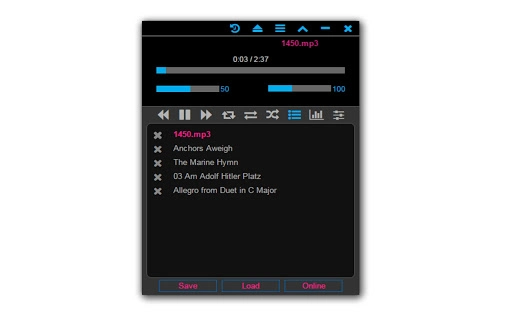
The user interface of Impulse Response is structured around simplicity and integration with the Chrome environment. Navigation is streamlined, allowing users to switch between local files and online streams with minimal effort. The layout prioritizes accessibility, placing playback controls, playlist management, and source selection in intuitive locations.
Workflow efficiency is enhanced by the application’s ability to load and manage multiple audio sources simultaneously. Users can add stations, playlists, or local files with a few clicks, making the setup process quick and straightforward. Performance details were not specified by the developer, but the application’s lightweight nature—25.8 MB in size—suggests low resource consumption.
The developer did not specify resource usage details, so actual CPU and RAM behavior remains unknown. Stability is expected to be consistent with Chrome-based applications, though this is based on general software behavior patterns. No reports of crashes or freezes were provided.
The software’s reliance on Chrome means that performance may vary depending on the browser’s current state and system load.
Compatibility & System Requirements
Impulse Response is available for both Windows and Mac operating systems, making it accessible to a broad user base. The software version is 2.0, released on April 10, 2024. The installation size is 25.8 MB, indicating a compact footprint.
Platform compatibility information is limited to the operating systems mentioned, with no further details on specific Windows or macOS versions. The developer did not provide additional system requirements, so exact hardware specifications such as RAM, CPU, or disk space beyond the file size are not available. Compatibility with SRWare Iron is explicitly excluded, confirming that only Google Chrome is supported.
Users must ensure that Google Chrome is installed and up to date to use the application effectively. The software relies on Chrome’s audio capabilities, meaning that performance and functionality are dependent on the browser’s environment.
Pros and Cons
Pros
- Supports both online streaming and offline playback
- Integrated with Google Chrome for seamless audio handling
- Includes DSP effects like Chorus, Delay, and Reverb
- Lightweight at 25.8 MB in size
- Free to download and use
Cons
- Not compatible with SRWare Iron or non-Chrome browsers
- No official system requirements provided
- Dependent on Google Chrome for operation
- Limited to Chrome-supported audio formats
- Developer information not disclosed
FAQ Section
Is Impulse Response compatible with Mac and Windows?
Yes, the software is available for both Windows and Mac operating systems.
Can I use Impulse Response without an internet connection?
Yes, you can play local music files stored on your device, as long as they are in a format supported by Google Chrome.
Does Impulse Response support audio effects like reverb and delay?
Yes, the software includes built-in DSP effects such as Chorus, Delay, and Reverb for enhanced audio output.
Is the software free to use?
Yes, Impulse Response is available at no cost.
Do I need to install Google Chrome to use this software?
Yes, Impulse Response requires Google Chrome to function. It is not compatible with SRWare Iron or other non-Chrome browsers.
Final Thoughts + CTA
Impulse Response delivers a focused and efficient solution for users seeking a unified platform to manage both local and online audio content. Its integration with Google Chrome ensures compatibility with a wide range of audio formats and smooth streaming performance. The inclusion of DSP effects adds a layer of customization for audiophiles and content creators.
While the lack of detailed system requirements and developer transparency are notable limitations, the software’s lightweight design and free access make it an attractive option for casual listeners and media enthusiasts. It is particularly beneficial for those already invested in the Chrome ecosystem and who value simplicity and versatility. The software’s ability to handle both online and offline music in one interface sets it apart from more fragmented alternatives.
For users looking for a reliable, no-cost audio utility with broad online support, Impulse Response is a solid choice. Download Impulse Response now.







